INDEPENDENT BY DESIGN. RECON ONE GROUP LTD. SOFTWARE FOR THE WAY YOU WORK
Recon One dragon shieldRECON ONEGROUP LTD
AFTERREADY / A RECON ONE GROUP LTD PRODUCT
AfterReadyBY RECON ONE GROUP LTD

Professional aftercare.
Ready to hand over.

Turn your job instructions into a branded guide your customer can keep. AfterReady brings aftercare guides, invoices, customer records and job planning together in one offline app for your computer.

  • Your business details and logo on your documents
  • Aftercare guides and invoices you can export as PDFs
  • One business licence. One payment. No subscription.
£19.99one-time purchaseOne business licence
Try the free demo
Digital ZIP download · Desktop or laptop · Current Chrome or Edge

Available to UK customers. Try the free browser demo before buying.

AFTERREADYOFFLINE BUSINESS WORKSPACE
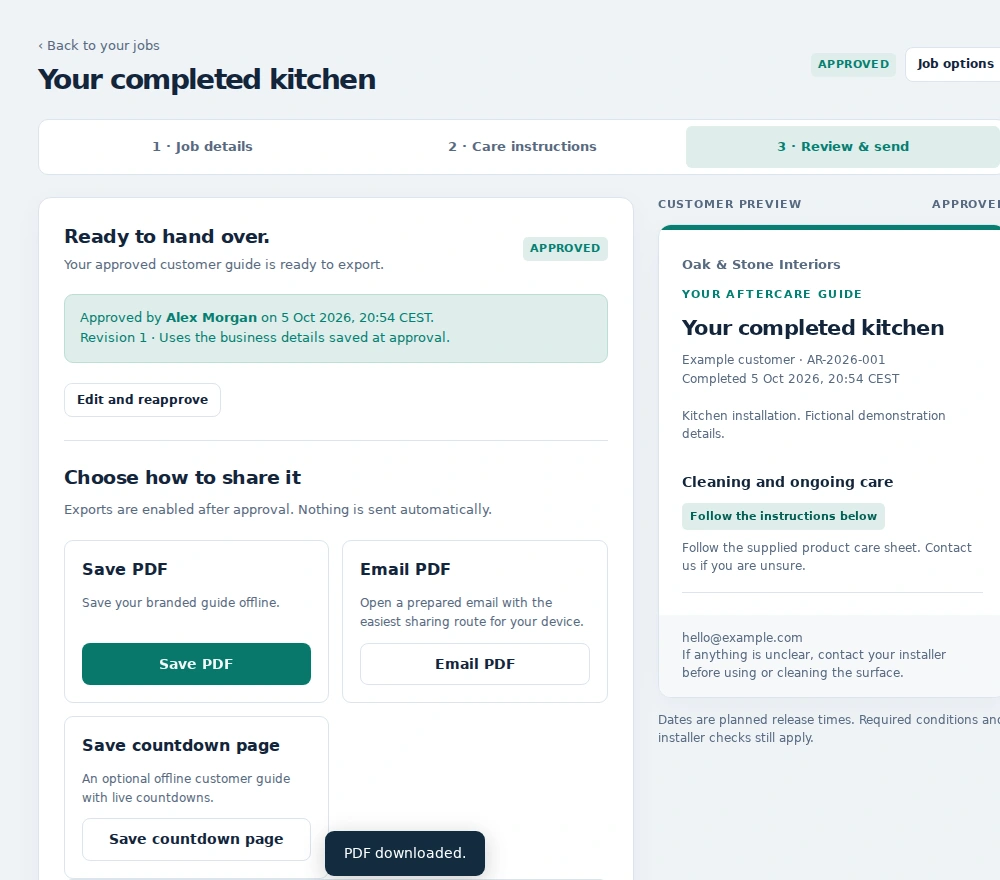
Actual AfterReady app review and PDF export screen
Created by Recon One Group LtdYour work. Your workspace.

THE FULL AFTERREADY EDITION

What AfterReady does.

AfterReady is a downloadable business workspace for tradespeople and small businesses. Its main purpose is to help you leave customers with clear, branded aftercare instructions after a job. It also brings the paperwork and records around that job into the same app.

01 / CUSTOMER AFTERCARE

Give your customer a useful guide.

Add your business details, logo, customer and job information. Write the care instructions, reuse or adapt care cards, and review the result before exporting a branded PDF. Send the PDF through your own email service or print a copy.

02 / BRANDED INVOICES

Put your name on your paperwork.

Create invoices with your logo, business details and bank details. Use VAT settings where applicable, record deposits and show the remaining balance. Include your own payment policy as extra PDF pages.

03 / CUSTOMER RECORDS

Keep details ready for the next job.

Save customer details in the app rather than entering them again each time. Customer tools include CSV import, helping you bring existing records into your workspace.

04 / JOB PLANNING

Keep planned work together.

Organise planned jobs, dates and times alongside your customer records. Keep the information around each job in the same offline workspace as your documents.

05 / POLICY LIBRARY

Keep your supporting documents organised.

Store your own policy PDFs in folders and search for the document you need. Your policies and job-specific advice remain yours to provide, review and keep up to date.

06 / YOUR WORKSPACE

Make it comfortable. Keep a backup.

Choose light or dark colours, adjust writing size and panel styles, and make full backups of your browser-held work. The app runs locally on a desktop or laptop in current Chrome or Edge.

Before you choose

£19.99 once for one business licence. The paid app is designed for computers, rather than phones. It creates documents; it does not collect customer payments, file tax returns or provide MTD, CIS or bank reconciliation.

Check the download contents and requirements
WHAT YOU CAN DO WITH AFTERREADY

From finished job
to professional handover.

  1. 01 / BRAND IT

    Add your business

    Enter your business details and add your logo, so the guide looks like it came from you.

  2. 02 / MAKE IT USEFUL

    Write the customer’s guide

    Add the customer, job details and care instructions. Use your own wording or adapt a reusable care card, then check the advice for that job.

  3. 03 / HAND IT OVER

    Review and export

    Preview the finished guide and export a PDF. Send it through your own email service or print a copy for the customer.

AfterReady creates the document. You choose how to deliver it to your customer.

TRY BEFORE YOU BUY

Explore your
professional handover.

Personalise a sample guide. Preview the layout. Entries stay in this page and reset when you reload.

A QUICK PRODUCT PREVIEW

Try a sample guide on your phone.

Add example details and see the guide take shape. The demo opens on its own page, giving you more room to explore.

Open the free demoPreview only. Saving, printing and PDF export are available in the paid app on desktop or laptop.
A separate limited demo, with a preview based on the AfterReady guide layout. PDF export, printing, saving, invoices and other business tools require the paid edition. Example details and guidance are fictional.
THE DETAILS / BEFORE YOU BUY
BEFORE YOU BUY

What you receive.
What you need.

What’s in the ZIP?

The full offline app, quick-start guide, written launch instructions, licence and software notices. Download the ZIP, extract the folder and open AfterReady.html.

What do I need?

A desktop or laptop with current Chrome or Edge. No installer or activation account is required. The paid app is designed for computers; you can browse this website and try the preview on your phone.

How is data stored?

Locally in your chosen browser. Make regular full backups before clearing browser storage, changing browser or moving computers.

What isn’t included?

No payment collection, tax filing, MTD, CIS or bank reconciliation. Your policies and job-specific instructions are yours to provide and check.

YOUR QUESTIONS, ANSWERED

Know what you’re buying.

Is £19.99 a monthly payment?

No. £19.99 is a one-time purchase for one business licence. There is no subscription for this edition.

What happens after I pay?

You receive a download link by email. Save the ZIP to your computer, extract it, follow the start-here instructions and open AfterReady.html in current Chrome or Edge.

Does it need an internet connection?

The app runs offline on your computer. You need internet to buy and download it, and to send your exported documents using your own email service.

Can I use the full app on my phone?

The paid edition is designed for a desktop or laptop using current Chrome or Edge. This website and the free browser preview are accessible on a phone.

Does AfterReady write the instructions for me?

You provide and check the guidance for your work. You can reuse or adapt care cards, but you remain responsible for making the instructions and policies accurate for each job.

What is different about the free demo?

The demo lets you personalise and preview a sample guide. It does not save your work, print or export PDFs. The paid edition includes those features, plus invoices, customer records, job planning and backup tools.

Where is my work saved?

Your app data is stored locally in your chosen browser. Make regular full backups, especially before clearing browser storage, switching browsers or moving to another computer.

Have a question about AfterReady?

Visit product support